Immediate billing with dynamic QR Code (immediate)
Prerequisites for implementation
-
Have a Celcoin API key, for more information access this link
-
Have familiarity with Rest APIs using the OAuth 2.0 protocol.
-
Have the product/solution enabled - if you want to purchase the functionality, please contact our sales team via email corp@celcoin.com.br . For technical questions, simply contact support via the link .
-
Have a registered Pix key - if your company does not have one, simply contact our support team and request that it be created. We do not register keys such as: CNPJ, email, or telephone, due to the possibility of fraud.
To enable receiving the QR Code, you must use the key above linked to your credential.
Why use an immediate billing QR Code?
-
You can receive ONLY ONE payment;
-
In addition to the value, it allows the insertion of more information, such as expiration time and debtor data;
-
Reconciliation via identifier, making it possible to associate the Pix transaction with the related charge;
-
In its internal structure, a URL is configured that is accessed at the time of reading. Therefore, the information provided by the URL may vary depending on several parameters;
-
The dynamic QR Code contains only the basic information of the receiving user. The others are in a webservice of the recipient's institution, based on this URL .
This functionality must be used to create a QR Code for immediate collection. So the use case could be:
As a fintech, I want to provide my users with the possibility of charging immediately through their Pix key, where they will only have to fill in the amount of the transaction and a QR Code and its "Pix Copy and Paste" code will be displayed for payment of the charge.
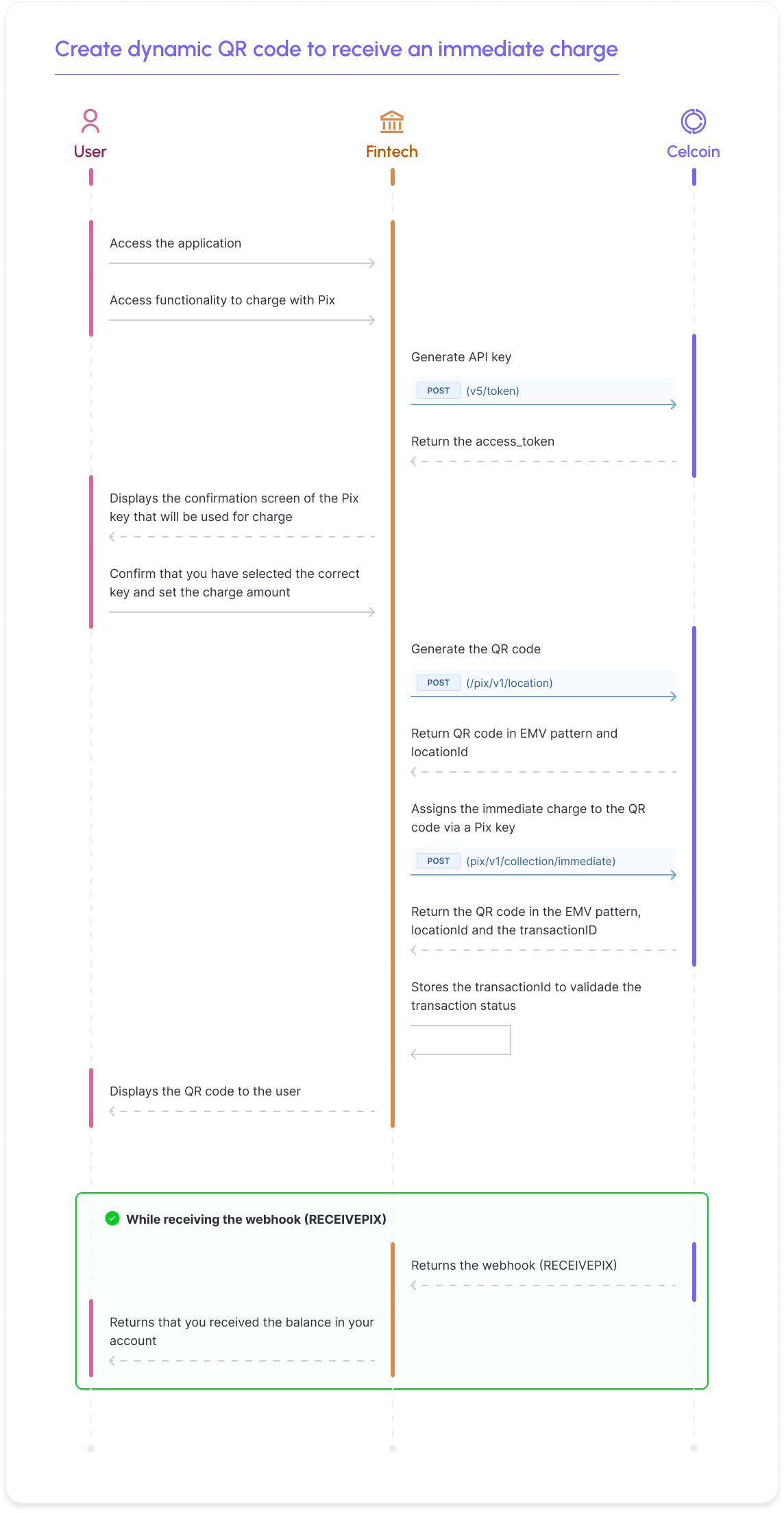
There are two flow options for creating an immediate QRCode charge, which are:
- In two steps, confirm the previous flowchart ( Creating the location + Creating the charge )
- In a single call, where we will internally create the Location and link it to immediate billing ( Dynamic ).
- Para criação de Qr Code Pix que terão regra de split no recebimento, não é possível usar esta rota. Favor consultar a documentação específica relacionada ao "Split Pix" na seção BaaS.
Creating an immediate Pix charge (Dynamic)
This call summarizes the two previous calls into a single Dynamic request in the same way, creating an immediate Pix charge.
Request model:
cURL
curl --location 'https://sandbox.openfinance.celcoin.dev/pix/v1/brcode/dynamic' \ --header 'accept: application/json' \ --header 'Content-Type: application/json-patch+json' \ --header 'Authorization: Bearer {access_token}' \ --data '{ "key": "testepix@celcoin.com.br", "amount": "10.00", "merchant": { "merchantCategoryCode": "5651", "postalCode": "06519435", "city": "barueri", "name": "Teste Celcoin" }, "debtor": { "name": "Fulano de Tal", "cnpj": "33188542046" }, "expiration": 30000, "clientRequestId": "e3434da1-b37e-43cd-97a9-df4d80d52208", "payerName": "Teste Celcoin", "payerCPF": "13935893000370", "payerQuestion": "Criacao do QRCode immediate teste" }'
The clientRequestId property must be populated with a unique id provided by your application.
Dentro do objeto debtor, deve ser informado o nome e CPF/CNPJ de quem irá pagar os valores.
O limite é de até 140 caracteres para esse campo e isso é determinado pelo Banco Central.
The key property must be filled in with the Pix key registered in the BaaS account for which you wish to receive the charge. In the above example, we used the key ""
Within the amount object, the charge amount must be entered and, finally, the calendar object must be populated with the QR Code expiration date. It is important to note that every dynamic QR Code has a set expiration time. If this date is not informed at creation, the duration of 86400 seconds will be assumed, which corresponds to 24 hours.
Return model:
JSON
{ "version": "1.0.0", "status": 201, "body": { "clientRequestId": "e3434da1-b37e-43cd-97a9-df4d80d52208", "pactualId": null, "transactionId": "4000095510", "createTimestamp": "2024-09-04T02:05:42.5489802Z", "lastUpdateTimestamp": "0001-01-01T00:00:00", "entity": "DynamicBRCode", "status": "ACTIVE", "tags": null, "transactionIdentification": "kk6g232xel65a0daee4dd13kk4000095510", "body": { "key": "testepix@celcoin.com.br", "revision": "0", "location": "qrcode-h.pix.celcoin.com.br/pixqrcode/v2/69e2bd66eecb47dfc632a5c7fcbcac", "debtor": { "name": "Teste Celcoin", "cpf": "13935893000370", "cnpj": null }, "amount": { "original": 10.00 }, "calendar": { "expiration": 30000, "dueDate": "2024-09-04T07:25:42.5489826" }, "dynamicBRCodeData": { "pointOfInitiationMethod": "12", "payloadFormatIndicator": "01", "countryCode": "BR", "merchantName": "Teste Celcoin", "merchantCity": "barueri", "transactionIdentification": "***", "transactionAmount": "10.00", "emvqrcps": "00020101021226930014br.gov.bcb.pix2571qrcode-h.pix.celcoin.com.br/pixqrcode/v2/69e2bd66eecb47dfc632a5c7fcbcac5204000053039865802BR5913Teste Celcoin6007barueri62070503***63045967", "merchantCategoryCode": 5651, "transactionCurrency": 986, "merchantAccountInformation": { "url": "qrcode-h.pix.celcoin.com.br/pixqrcode/v2/69e2bd66eecb47dfc632a5c7fcbcac" } }, "additionalInformation": null } } }
Sugerimos que seja armazenada, em sua aplicação, as propriedades transactionId e transactionIdentification, para conseguir receber da Celcoin o status da cobrança via webhook, createAt e expiration, para avaliar se o QR Code ainda é válido.
The Revision field indicates how many revisions have occurred in the QR Code and the Status field informs the current status of the immediate charge, which can be:
- "ACTIVE": active, but no payment has been made yet;
- "CONCLUDED": when the payment has already been made;
- "DELETED_BY_RECEIVING_USER": deleted by end user request;
- "DELETED_BY_PSP": deleted at the request of the Pix participant.
Checking the status of an immediate Pix charge (Dynamic)
É possivel consultar o status de uma cobrança imediata (Dynamic) através do endpoint Buscar dados de uma cobrança dinâmica. Esta chamada é indicada apenas para o fluxo de exceções, principalmente após o gatilho webhook.
A seguir o fluxo alternativo (com duas chamadas):
Creating a QR Code
To create a new charge, you need to generate a QR Code and link it to the data of the charge you want to execute. Therefore, the first step would be to create a QR Code, using the Create a QR Code (Location) API.
Request model:
cURL
curl --location 'https://sandbox.openfinance.celcoin.dev/pix/v1/location' \ --header 'accept: application/json' \ --header 'Content-Type: application/json-patch+json' \ --header 'Authorization: Bearer {access_token}' \ --data '{ "clientRequestId": "ed66c35f-65d7-4a5f-8ebe-9b7eb7f2e6e3", "type": "COB", "merchant": { "postalCode": "01201005", "city": "Barueri", "merchantCategoryCode": "0000", "name": "Celcoin Pagamento" } }'
Perceba que, no campo type, deve ser preenchido o valor COB e que o objeto merchant, precisa ser preenchido com o CEP, cidade e nome da sua empresa. A propriedade merchantCategoryCode, pode ser preenchida com valor 0000.
Regras do campo Amount
For transfers: The withdrawal and change objects should not be filled in.
For withdrawal: The "withdrawal" object must be filled and the 'amount.original' field must be 0.
For change: The 'change' object must not be filled in
Withdrawal and moving objects cannot be filled simultaneously
Return model:
JSON
{ "locationId": 4000178749, "status": "CREATED", "clientRequestId": "ed66c35f-65d7-4a5f-8ebe-9b7eb7f2e6e3", "url": "qrcode-h.pix.celcoin.com.br/pixqrcode/v2/cc6f977be3892de5460247e979f261", "emv": "00020101021226930014br.gov.bcb.pix2571qrcode-h.pix.celcoin.com.br/pixqrcode/v2/cc6f977be3892de5460247e979f2615204000053039865802BR5918Celcoin Pagamentos6007Barueri62070503***63041400", "type": "COB", "merchant": { "postalCode": "01201005", "city": "Barueri", "merchantCategoryCode": "0000", "name": "Celcoin Pagamentos" } }
If your request is received successfully, the status property will return CREATED .
We suggest that you store the locationId (QR Code), EMV, in your application, as you will need these values for future requests.
Creating an immediate Pix charge
Then, the request must be made in the Create immediate charge API, to link the QR Code created in the location request, to an immediate Pix charge.
Request model:
cURL
curl --location --request POST 'https://sandbox.openfinance.celcoin.dev/pix/v1/collection/immediate' \ --header 'accept: application/json' \ --header 'Content-Type: application/json-patch+json' \ --header 'Authorization: Bearer {access_token}' \ --data-raw '{ "clientRequestId": "14232341231", "payerQuestion": "Não pagável após vencimento.", "key": "testepix@celcoin.com.br", "locationId": 12730559, "debtor": { "name": "Fulano de Tal", "cnpj": "33188542046" }, "amount": { "original": 15.00, "changeType": 0 }, "calendar": { "expiration": 86400 }, "additionalInformation": [ { "value": "Assinatura de serviço", "key": "Produto 1" } ] }'
The clientRequestId property must be populated with a unique id provided by your application.
Within the debtor object, the name and CPF/CNPJ of the person who will pay the amounts must be informed.
The key property must be filled in with the Pix key of the receiving user, that is, the Pix key of your Celcoin account. This key is generated by our support team, once your account is approved. In the example above, we used the key " testepix@celcoin.com.br "
Within the amount object, the charge amount must be entered in the original field. Additionally, if the changeType field is set to 0, it means that the original amount cannot be changed at the time of payment. This validation must be carried out by the paying PSP at the time of settlement.
Finally, the calendar object must be populated with the QR Code expiration date. It is important to note that every dynamic QR Code has a set expiration time. If this date is not informed at creation, the duration of 86400 seconds will be assumed, which corresponds to 24 hours.
Return model:
JSON
{ "revision": 9267254, "transactionId": 9267254, "clientRequestId": "9b26edb7cf254db09f5449c94bf13abc", "status": "ACTIVE", "lastUpdate": "2021-04-29", "payerQuestion": "Esta cobrança é referente a...", "additionalInformation": [ { "value": "Assinatura de serviço", "key": "Produto 1" } ], "debtor": { "name": "Fulano de Tal", "cpf": "11122233366", "cnpj": "1112223300100" }, "amount": { "original": 0, "changeType": 0, "withdrawal": { "vldnAmount": 10, "agentMode": "AGTEC", "withdrawalServiceProvider": "13935893", "changeType": 0 }, "change": { "vldnAmount": 10, "vlcpAmount": 15.55, "agentMode": "AGTEC", "withdrawalServiceProvider": "13935893", "changeType": 0 } }, "location": { "merchant": { "postalCode": "01201005", "city": "Barueri", "merchantCategoryCode": "0000", "name": "Celcoin Pagamentos" }, "url": "string", "emv": "string", "type": "string", "locationId": "string", "id": "string" }, "key": "5d000ece-b3f0-47b3-8bdd-c183e8875862", "calendar": { "expiration": 86400 }, "createAt": "2021-04-29", "transactionIdentification": "kk6g232xel65a0daee4dd13kk479195205" }
Sugerimos que seja armazenada, em sua aplicação, as propriedades transactionId e transactionIdentification, para conseguir receber da Celcoin o status da cobrança via webhook, createAt e expiration, para avaliar se o QR Code ainda é válido.
The Revision field indicates how many revisions have occurred in the QR Code and the Status field informs the current status of the immediate charge, which can be:
- "ACTIVE": active, but no payment has been made yet;
- "CONCLUDED": when the payment has already been made;
- "DELETED_BY_RECEIVING_USER": deleted by end user request;
- "DELETED_BY_PSP": deleted at the request of the Pix participant.
Checking the status of an immediate Pix charge (Immediate)
It is possible to check the status of an immediate charge (Immediate) through the endpoint Search for data from a dynamic charge . This call is only indicated for the exception flow, especially after the webhook trigger presented at the end of this page.
Receiving collection status with trigger
A webhook is a way of receiving information asynchronously, where triggers are generally fired, in JSON format, when an event occurs. If the payment is successful, Celcoin fires a trigger ( RECEIVEPIX ) in its webhook.
To configure a webhook, you must contact our support team, providing your webhook URL, password and username, in BASIC format . This way, they will register you on our platform so that triggers can be sent.
No ambiente Sandbox é possível testar o recebimento do webhook para o Cash-out e o webhook para o Cash-in.
RECEIVEPIX webhook template:
JSON
{ "RequestBody": { "TransactionType": "RECEIVEPIX", "TransactionId": 56762766, "Amount": 150.55, "DebitParty": { "Account": "416781236", "Bank": "18236120", "Branch": "1", "PersonType": "NATURAL_PERSON", "TaxId": "33188542046", "AccountType": "CACC", "Name": "Fulano de Tal" }, "CreditParty": { "Bank": "13935893", "Branch": "1", "Account": "123456789", "PersonType": "NATURAL_PERSON", "TaxId": "09876543210", "AccountType": "CACC", "Name": "Cicrano de Outro", "Key": "8ea152b1-ddee-ssaa-aass-ce98245349aa" }, "EndToEndId": "E18236120202001199999s0149012FPC", "transactionIdentification": "kk6g232xel65a0daee4dd13kk54578675", "transactionIdBRCode": "54578675" } }
No webhook (RECEIVEPIX ) retornarmos o campo transactionIdBrCode que se refere ao transactionid do QR Code gerado e o transactionIdentification. Ambos podem ser utilizados para validar o pagamento do QR Code.
It is very important that the partner validates the amount charged and the amount reported in the " Amount " field of the receiving webhook, in order to reconcile the expected amount with the amount actually paid and avoid possible losses.
Application example
We created a prototype application to exemplify the use of the API:
Se entre o ato de emitir o Qr Code Pix (de qualquer natureza) e o momento do efetivo pagamento a chave Pix associada aquele Qr Code for excluída, ao tentar ler o Qr Code Pix, o banco pagador retornará um erro ao cliente que não foi possível encontrar aquela chave Pix ou ler aquele Qr Code. Esse retorno ocorrerá no ambiente do banco pagador e a Celcoin não tera visibilidade do mesmo. É importante não excluir chaves Pix associadas a Qr Codes que ainda estejam em aberto.